← cd ..

Clayo

Every Claude Code and Codex session in one Windows window, plus an island that tells you which one needs you.

Role
Solo: design, build, ship
Timeline
Sep – Oct 2026
Stack
.NET 8 · WPF · ConPTY · WebView2
Status
v1.0.3 · MIT · public
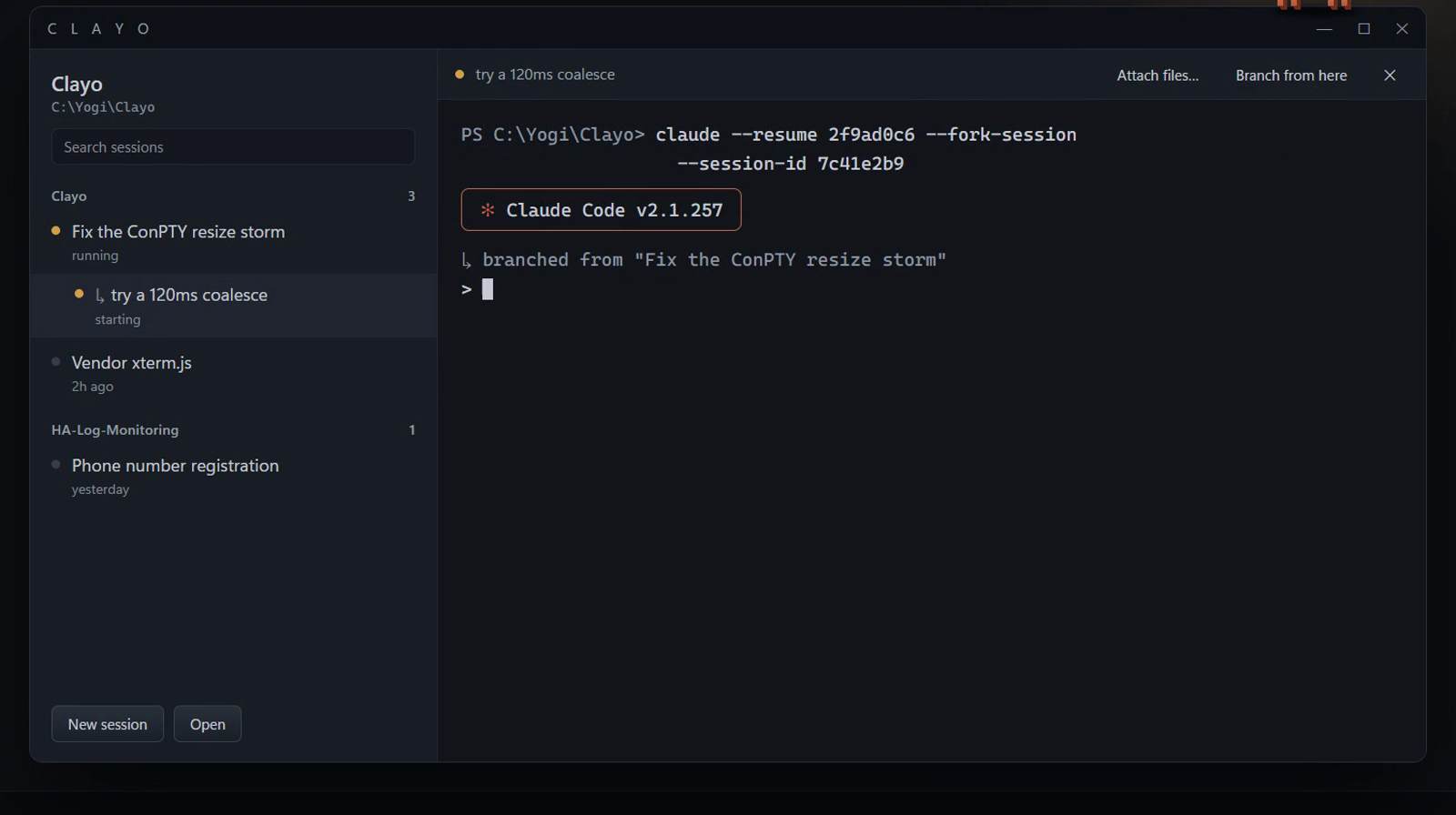
Clayo: sessions grouped by folder on the left, a real Claude Code terminal on the right

Sessions grouped by folder on the left, with branches nested under their parent. The real Claude Code terminal on the right.

Context

The problem

Working with AI coding agents means running four or five sessions at once, each in its own terminal. One is waiting for a permission, one finished ten minutes ago, and you're in the browser.

A session stuck on a permission prompt does nothing until you notice. The cost isn't the agent's time, it's yours: switching windows to check.

Goal: one window for every session, and a signal that reaches you wherever you are, without interrupting what you're doing.

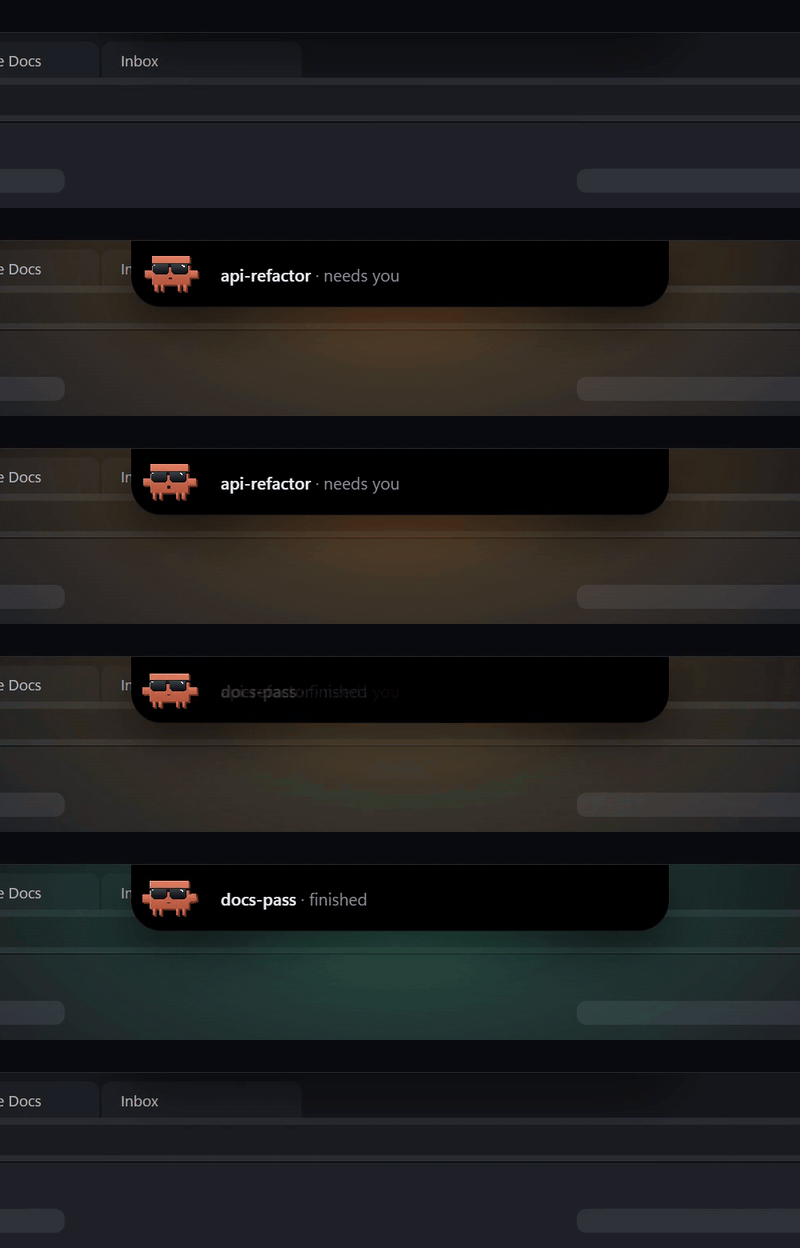
The island drops from the top of the screen when a session needs you, then turns green when one finishes

The island: it drops in when a session needs you and never takes keyboard focus.

Architecture

How it fits together

Hover or tap any box for a plain-English explanation. The moving dots are data flowing between parts.

clayo.exe · runs on your PC transcripts status JSON sessions limits bytes spawns needs you / done notice keys You Sidebar WPF · session tree Terminal pane WebView2 + xterm.js Island WS_EX_NOACTIVATE Session store ~/.claude · ~/.codex (read) ConPTY pseudo-console per pane Status relay status/<id>.json Agent CLIs claude · codex
tipHover or tap a box to see what it does and why it's there.

Key decisions

The tradeoffs that shaped it

Written as short architecture decision records: what the situation was, what I chose, and what it cost.

ADR-01Host the real terminal, don't rebuild a chat UI

Context
The agents can be driven as a stream of JSON messages and rendered in a native, prettier chat view.
Decision
Embed the genuine terminal (ConPTY + xterm.js) and put the polish into everything around it.
Tradeoff
A terminal in a box never looks as designed as a native view. In exchange, slash commands, permission prompts, plan mode and the status line keep working, including future features of the CLI.

ADR-02Clayo owns the branch graph

Context
Nothing in the agents' transcripts records which session a fork came from.
Decision
Pre-allocate the child session's ID before launching it, and persist the parent→child edge in one small JSON file.
Tradeoff
One more file to keep in sync, but it's the piece that makes the session tree possible at all.

ADR-03Notify without interrupting

Context
A notification that grabs focus breaks your typing; a hidden "hot strip" at the top of the screen covers the browser's tab bar.
Decision
A no-activate tool window, no window at all while hidden (the cursor position is polled instead), stays quiet during fullscreen and presentations.
Tradeoff
A cheap poll instead of an event, slowed to 250 ms when the cursor is away from the top edge.

ADR-04Don't kill everything a pane started

Context
A Windows job object would clean up every child process when a pane closes.
Decision
Dropped it. Console children already exit with the pane, as in Windows Terminal.
Tradeoff
Less aggressive cleanup, but closing a pane no longer kills an editor you opened from it with code .

ADR-05Integrity now, code signing later

Context
Code-signing certificates cost money and take time; an unsigned download is still a real risk.
Decision
Ship SHA-256 checks and GitHub build attestations now; add Authenticode via a free open-source signing program later.
Tradeoff
Windows SmartScreen still warns on first run until signing lands.

Build log

From scaffold to launch

The real history, condensed from 40 commits and 15 pull requests.

  1. Oct 7

    Send a screenshot to any session from the island

  2. Oct 5v1.0.2

    Security, stability and leak fixes before public launch

  3. Oct 4v1.0.1

    Self-update from inside the app, one-line install

  4. fd1ff33Oct 3v1.0.0

    Setup screen, limits in the sidebar, codebase grouped by feature

  5. Oct 1–2

    The island: notices, mascot, drop a file to open it

  6. Sep 2

    Branches nested under their parent session

  7. Sep 1

    init: scaffold, design docs, a terminal pane that actually works

Security

The pre-launch audit

Before posting it publicly, I audited Clayo for security and memory issues and fixed them in one release.

RiskFix
Tampered download or update
→
SHA-256 + build attestation, checked before unpackingUpdates are fetched from the release tag, not the main branch.
Malicious link in terminal output
→
Web view locked to its own pageLinks go through a confirm step and open in your real browser.
Untrusted IDs, paths and git config
→
Quoted everywhere; risky git hooks offA repo can't make Clayo run its code just by being opened.
Crash or leak when a pane fails
→
Isolated panes, handles releasedA failing pane can't take the app down or leave a shell behind.
Unbounded files on disk
→
Pruned and rotatedStatus files older than 7 days are removed; the crash log rotates at 1 MB.

Outcome

Where it landed

32 days
first commit to v1.0
4
public releases
16
automated self-checks
~10k
lines of C# and XAML

What I'd do next

  • Code-sign releases so Windows stops warning on first run.
  • Use the agents' hooks for exact permission status instead of reading terminal output.
← Back to all work